Tweaker for Outlook Express1.0
Publisher Description
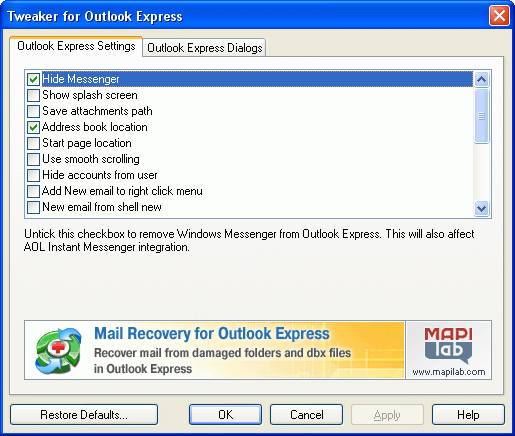
Tweaker for Outlook Express is a freeware product. It enables you to expand opportunities of Outlook Express and clean some lacks. Friendly interface Tweaker for Outlook Express is absolutely clear even for the unsophisticated user and allows applying it in operation easily. The changes that you do by this product can be restored by using "Restore Defaults..." button.
Program Features:
Tweaker for Outlook Express allows you to:
- hide "MSN Messenger" in Outlook Express menu.
- turn off the Outlook Express splash screen.
- change the path where message attachments are stores.
- change the path where Address Book is stored.
- change the Outlook Express start page location.
- use smooth message scrolling.
hide the Accounts Settings dialog from menu (to protect it from the changes)
- block executable attachments to protect you from the viruses.
hide or show the attached images at the bottom of the message.
- change the Windows title for the dialogs of Outlook Express.
change the small animation logos in Outlook Express and Internet Explorer.
- change the indent character from " -> " to other when you reply the message.
- change the database location for messages and news.
hide "Hotmail" tab from menu "Tools" -> "New Account Signup".
Product homepage:
http://www.mapilab.com/outlook_express/tweaker/
About Tweaker for Outlook Express
This Other Email Tools program is available in English. It was last updated on 29 September, 2026. Tweaker for Outlook Express is compatible with the following operating systems: Windows.
The company that develops Tweaker for Outlook Express is MAPILab Ltd.. The latest version released by its developer is 1.0. This version was rated by 2 users of our site and has an average rating of 4.0.
The download we have available for Tweaker for Outlook Express has a file size of 1.0 MB. Just click the green Download button above to start the downloading process. The program is listed on our website since 2006-09-21 and was downloaded 211 times. We have already checked if the download link is safe, however for your own protection we recommend that you scan the downloaded software with your antivirus. Your antivirus may detect the Tweaker for Outlook Express as malware if the download link is broken.
How to install Tweaker for Outlook Express on your Windows device:
- Click on the Download button on our website. This will start the download from the website of the developer.
- Once the Tweaker for Outlook Express is downloaded click on it to start the setup process (assuming you are on a desktop computer).
- When the installation is finished you should be able to see and run the program.
Program Details
System requirements
Download information
Pricing
Version History
version 1.0
posted on 2006-09-21
Release
